
|
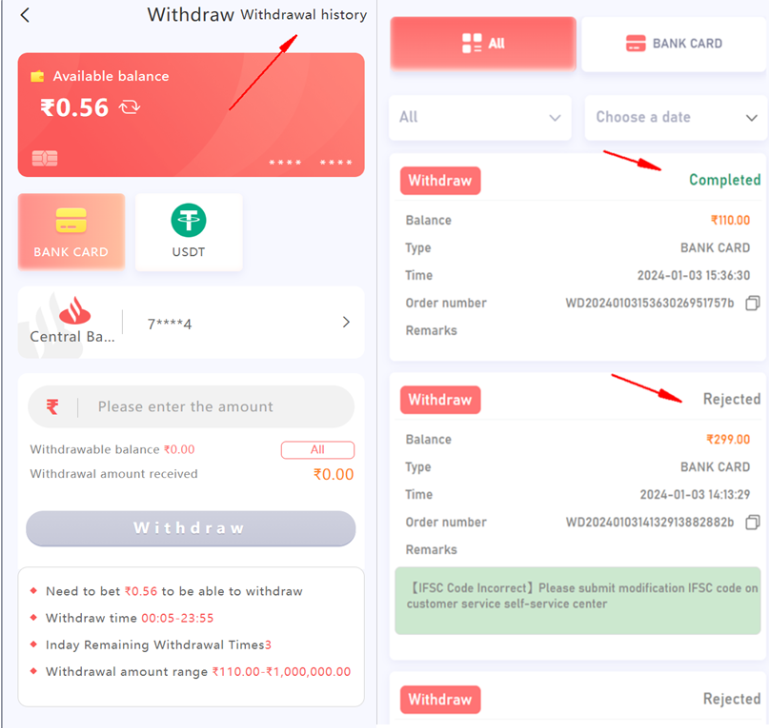
How To Check Withdraw Status To inquire about your withdrawal concerns, please check your withdrawal status in withdraw history! query and resolve your issue based on your withdrawal status! 91CLUB will show three statuses in the withdrawal record. 1. PROCESSING: This status need you to wait patiently, each payment need to submit to the bank for processing, and the status mean already submitted to the bank for processing, if the payment status not updated more than 3 hours, that mean the payment still on processing at the bank and need to wait till the bank giving the result, please wait patiently till the status change. 2. SUCCESSFUL: For this status mean the payment you submitted, we already transferred the amount to the bank account you bound, due to bank payment reasons, some orders are often delay in arriving, please wait 72 hours or 3 days bank working day if you still not received the amount, please submit an email to 91CLUB and provide bank statement PDF file and withdrawal order number not receive for our specialist team can help to check further 3.REJECTED: For this status, the withdrawal you apply is failed, please check the remark or note to see the reason for your withdrawal rejection and solve it according to the remark or note display. |
|
How To Withdraw Money 91CLUB are providing two withdraw payment method using Bank Card and USDT method, here is How To Withdraw Money on 91CLUB: A.Bank Card Method You must link your card first, go to the withdraw menu and follow these steps: 1. Click add a bank account 2. Select the bank you want to register with 3. Fill in all the requirement information correctly (your full name, bank account number, active phone number, email address and IFSC code) 4. Click Save and SMS Verification menu will appear 5. Click the Send Button 6. Fill the correct OTP Code 7. Click “Add confirm” button 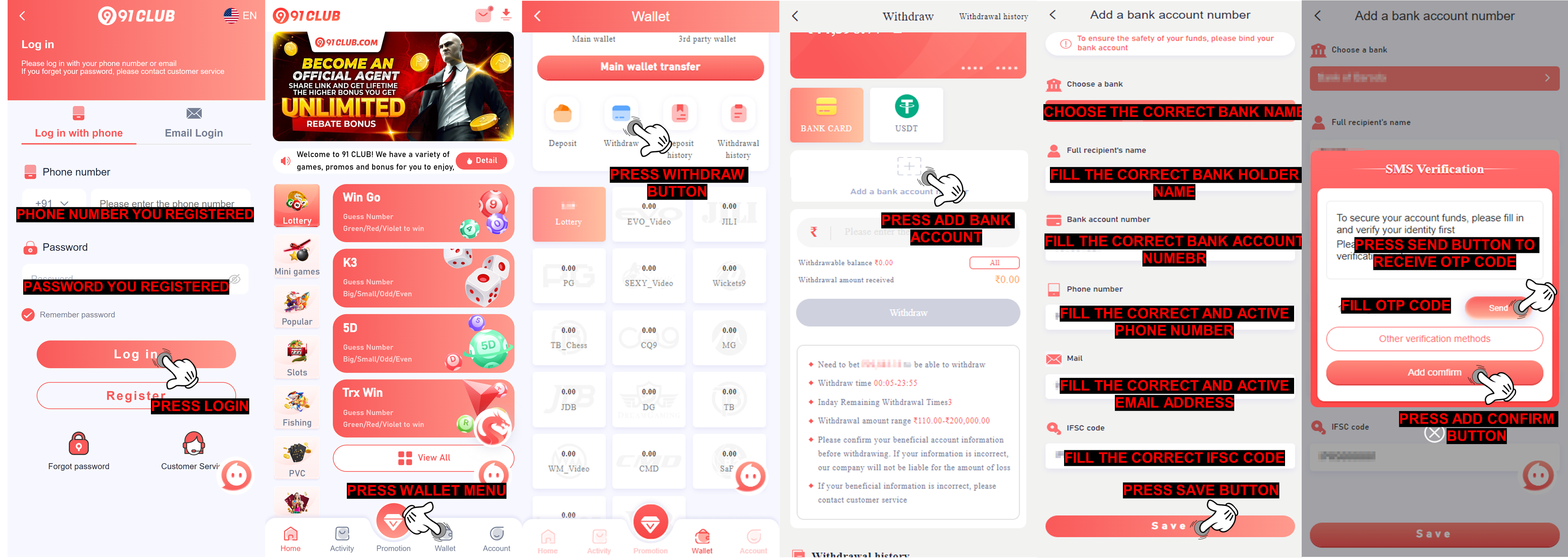 Note : Please be sure to confirm the accurate of your information when filling in your bank account, especially the IFSC code (IFSC is the branch code of your bank same with USDT address. You can consult your bank information on customer service bank or enter the bank from APP to check. If the bank information is filled in incorrectly, it will cause your withdrawal problems ! B. USDT method To bind USDT address, go to the withdraw menu and follow these steps: 1. Click USDT method 2. Click Address USDT 3. Select main network " TRC " 4. Fill USDT address 5. Fill USDT address again on Address Alias 6. Click Save and SMS Verification menu will appear 7. Click the Send Button 8. Fill the correct OTP Code 9. Click “Add confirm” button 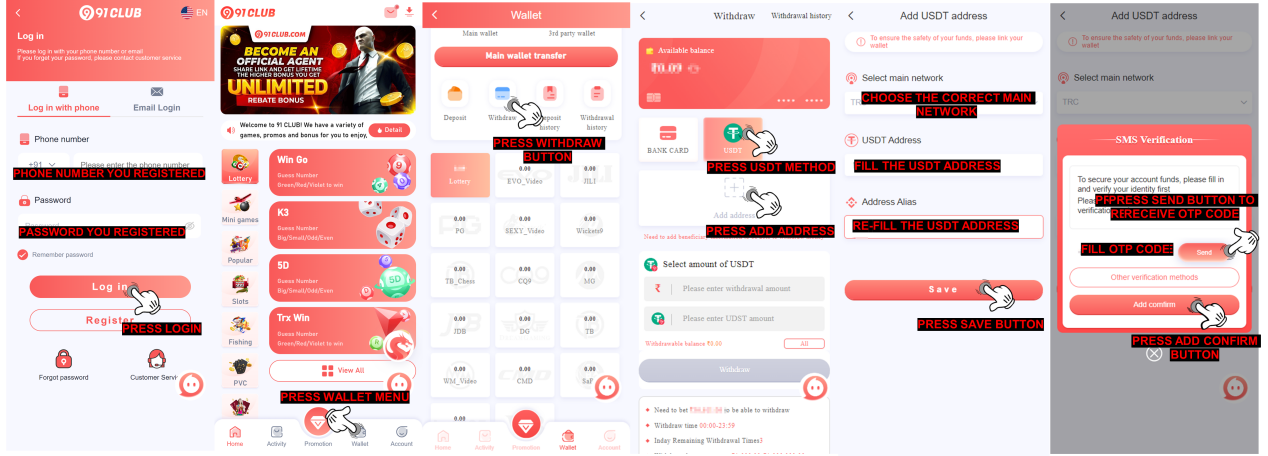 91CLUB will show three statuses in the withdrawal record. 1. PROCESSING: This status need you to wait patiently, each payment need to submit to the bank for processing, and the status mean already submitted to the bank for processing, if the payment status not updated more than 3 hours, that mean the payment still on processing at the bank and need to wait till the bank giving the result, please wait patiently till the status change. 2. SUCCESSFUL: For this status mean the payment you submitted, we already transferred the amount to the bank account you bound, due to bank payment reasons, some orders are often delay in arriving, please wait 72 hours or 3 days bank working day if you still not received the amount, please submit an email to 91CLUB and provide bank statement PDF file and withdrawal order number not receive for our specialist team can help to check further 3.REJECTED: For this status, the withdrawal you apply is failed, please check the remark or note to see the reason for your withdrawal rejection and solve it according to the remark or note display. 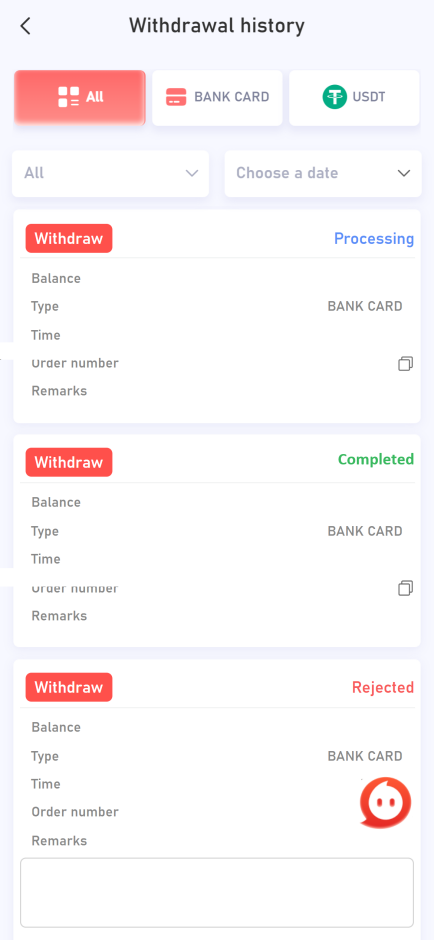 |
|
Gift Codes Withdrawal rejected due rules for gift pack codes/red envelopes, if you spamming claim gift codes / red envelopes, the withdrawal will be rejected by withdrawal department, for you can use gift codes you must to make a deposit first and if you use gift codes first before make the deposit will also get rejected Q: Why my withdraw rejected with remark gift codes? A: This withdraw reject issues because gift codes / red envelopes have a rules, if you spam claiming the gift codes / red envelopes the withdrawal will be rejected by withdrawal department, in order to use gift codes you should deposit before use the gift codes / red envelopes if you claiming the red envelopes first and deposit after also will also rejected 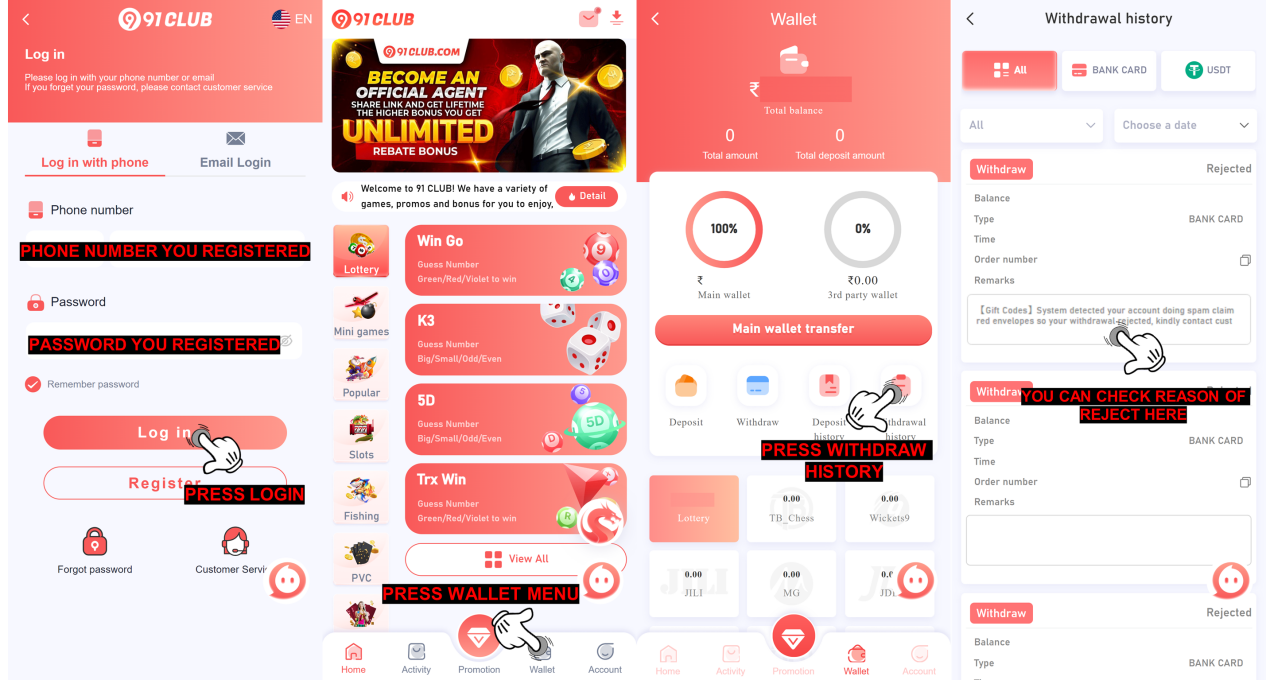 |
|
Bank Data Error The bank account you bound is incorrect. There are some possible data errors, such as incomplete name, bank account number or bank name or IFSC code incorrect. please submit delete bank account on the self-service customer service center https://www.91service.in/ to delete your bank account! Q: Why my withdraw rejected with remark bank data incorrect? A: This rejection is due to your bank account bound on 91CLUB account might be incorrect, there is few possibility data incorrect like name incomplete, bank account number wrong, bank name wrong, or IFSC code wrong, please submit on self-service center to delete your bank data inside 91CLUB. Thank you 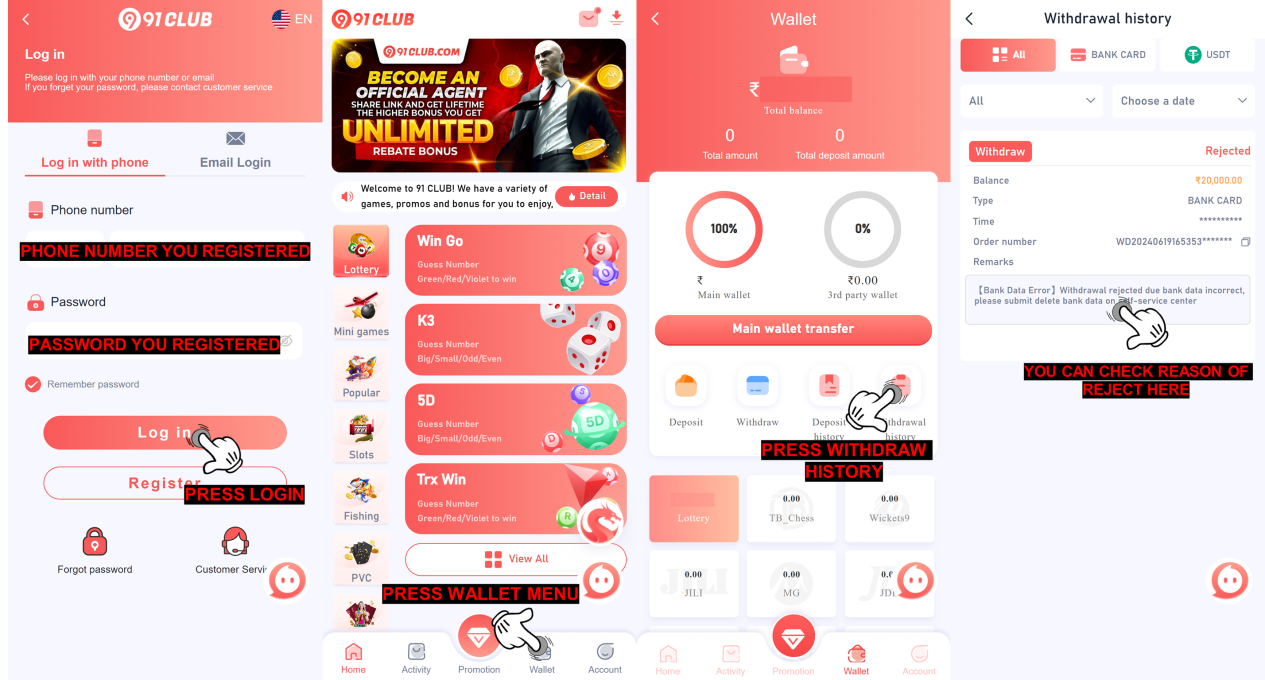 Q: What i need to do now to solve the problem remark bank data error A: What you need to do now is submit it on self-service center 91CLUB, follow this guide to submit it 1. Open self-service center 91CLUB https://www.91service.in/ 2. Select Delete Bank Account 3. Fill ID account 91CLUB 4. Upload photo selfie holding identity card (clear and detail) 5. Upload photo old passbook bank (clear and detail) 6. Upload the latest deposit proof receipt (clear and detail) 7. Press Submit Issue NOTE: Make sure all the data and requirement already fill and upload, clear and detail 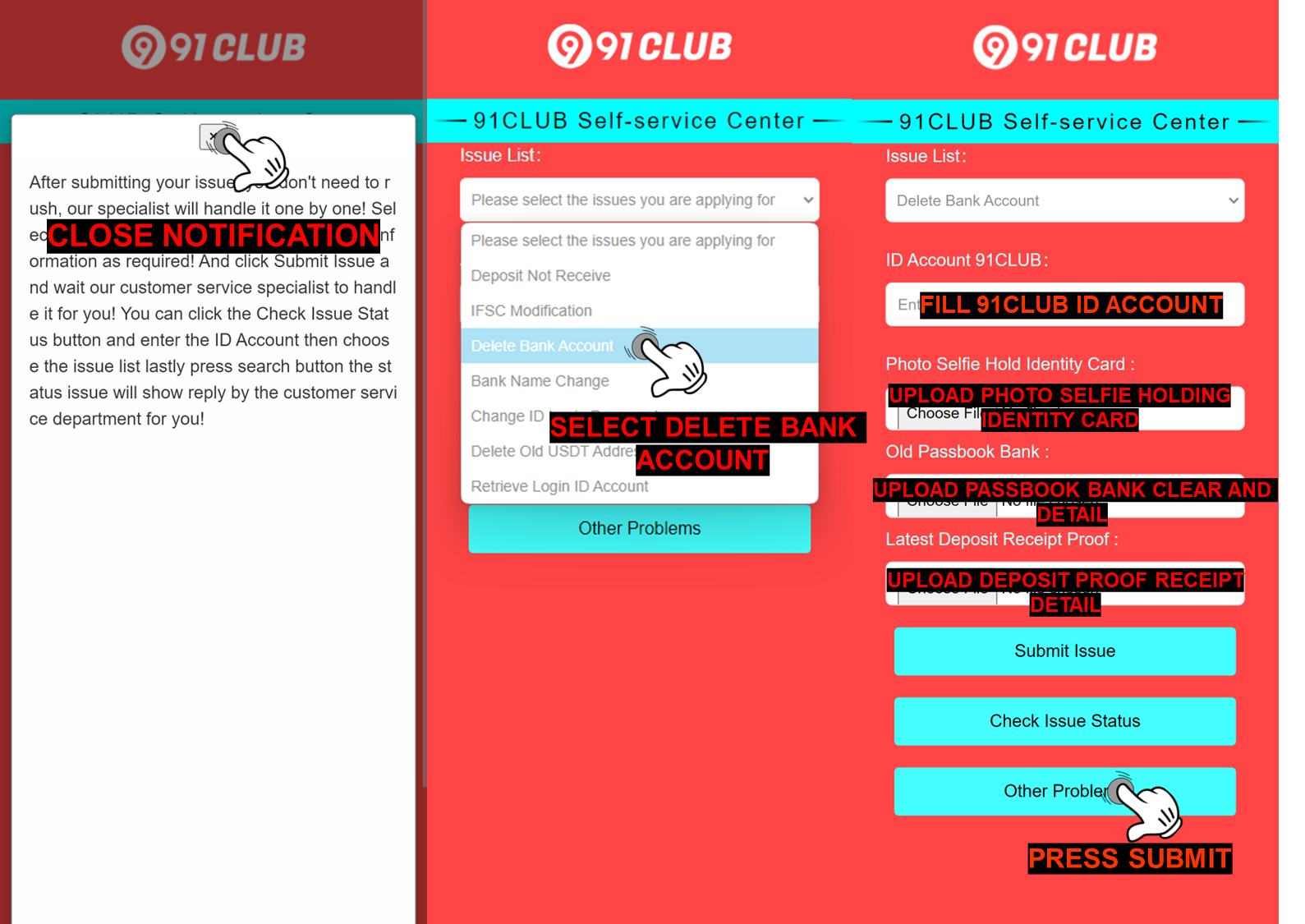 Q: What i need to do after the Delete Bank Account have been completed ? A: After the bank account deletion completed, member can add a new bank account or make a correction to the previous bank information that they bound in their ID account by go to “Withdraw”page and following the steps below : 1. Click add a bank account 2. Select the bank you want to register with 3. Fill in all the requirement information correctly (your full name, bank account number, active phone number, email address and IFSC code) 4. Click Save and SMS Verification menu will appear 5. Click the Send Button 6. Fill the correct OTP Code 7. Click Add confirm button 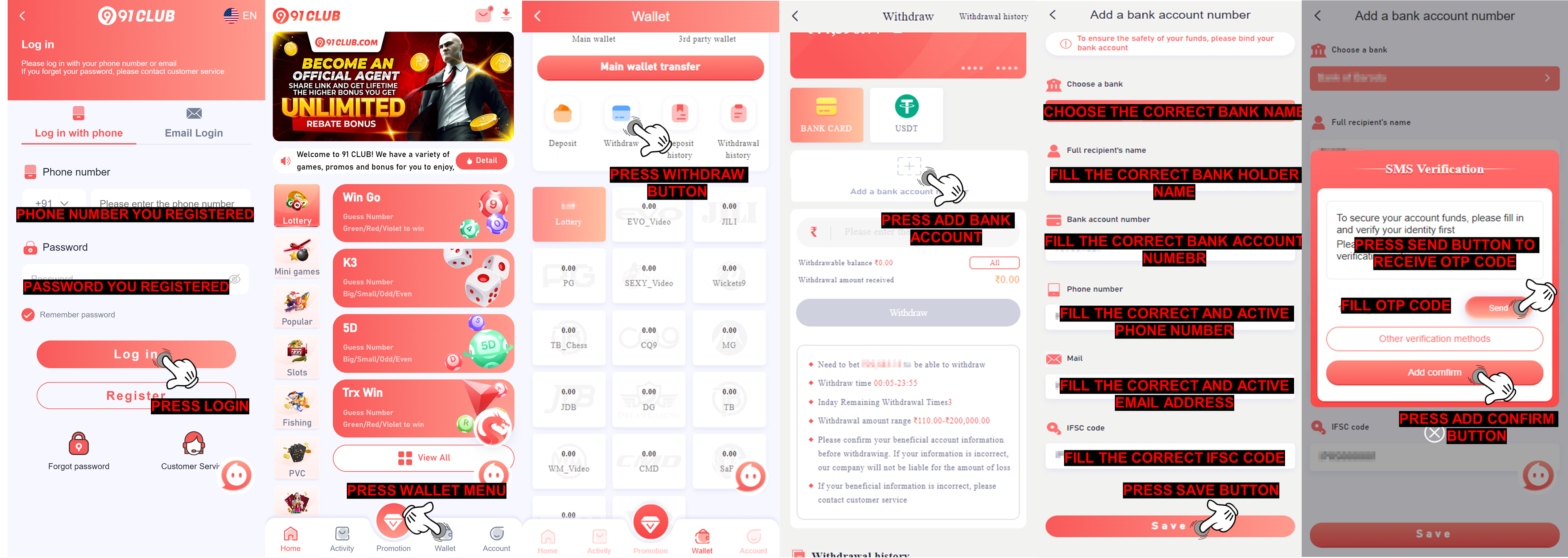 |
|
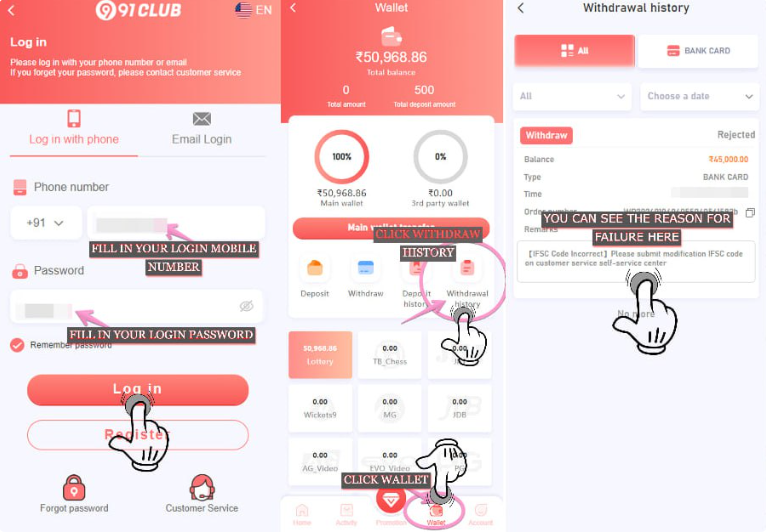
Illegal Betting Withdrawal rejected due to our team have found out that your ID account have committed a violation for place betting in our platform Q: Why my withdraw rejected with remark illegal betting ? A: This withdraw reject issues because our team discovered that your account was involved in illegal betting activities. Specifically, it appears that you placed bets on both sides of the same game, which is against our platform’s betting rules, or engaged in other prohibited activities. Q: What is the betting rules that i need to follow for avoiding this kind of issue appear in the future ? A : The only way to prevent this rejection issue appear is by doing the betting normally and avoiding to do the illegal betting or engaged in prohibited betting activity below : - Placing two-sided bets on the same game at the same time is prohibited (for instance, choosing green and red or big and small in the same round). - When placing a number wager, a total of seven numbers may be chosen in a single wager (no more). - Regularly wager on low odds bets in sports game for clear the turnover. - Doing a sparring with other ID and placing two-sided bets on the same game at the same time Q: What will happen to my ID account if my withdraw got rejected with remark Illegal Betting ? A : In order to maintain a fair and enjoyable gaming experience, our team will penalize this issue. These are to prevent our members from engaging in fraudulent activity in the future. There are several possible sanctions depending on the severity of the violation, which may include : - Deduction of game profits - Rejection of withdrawals - Turnover requirements Q : What i need to do if my withdraw got rejected with remark Illegal Betting ? A : If we find that our members have already followed the rules of the game, the withdrawals fund will proceed as normal. However, we would like to remind all of our members to not engage in the same activity in the future, and if we find that our members still intend to engage in the same violations in the future, we will impose additional penalties on their accounts. Q: How to check the remark of my withdraw? A: To check the remark of your withdrawal can be check with follow this guide 1.Login to your 91CLUB Account 2.Press Wallet menu 3.Press Withdrawal History 4.Check the withdrawal remark you encounter 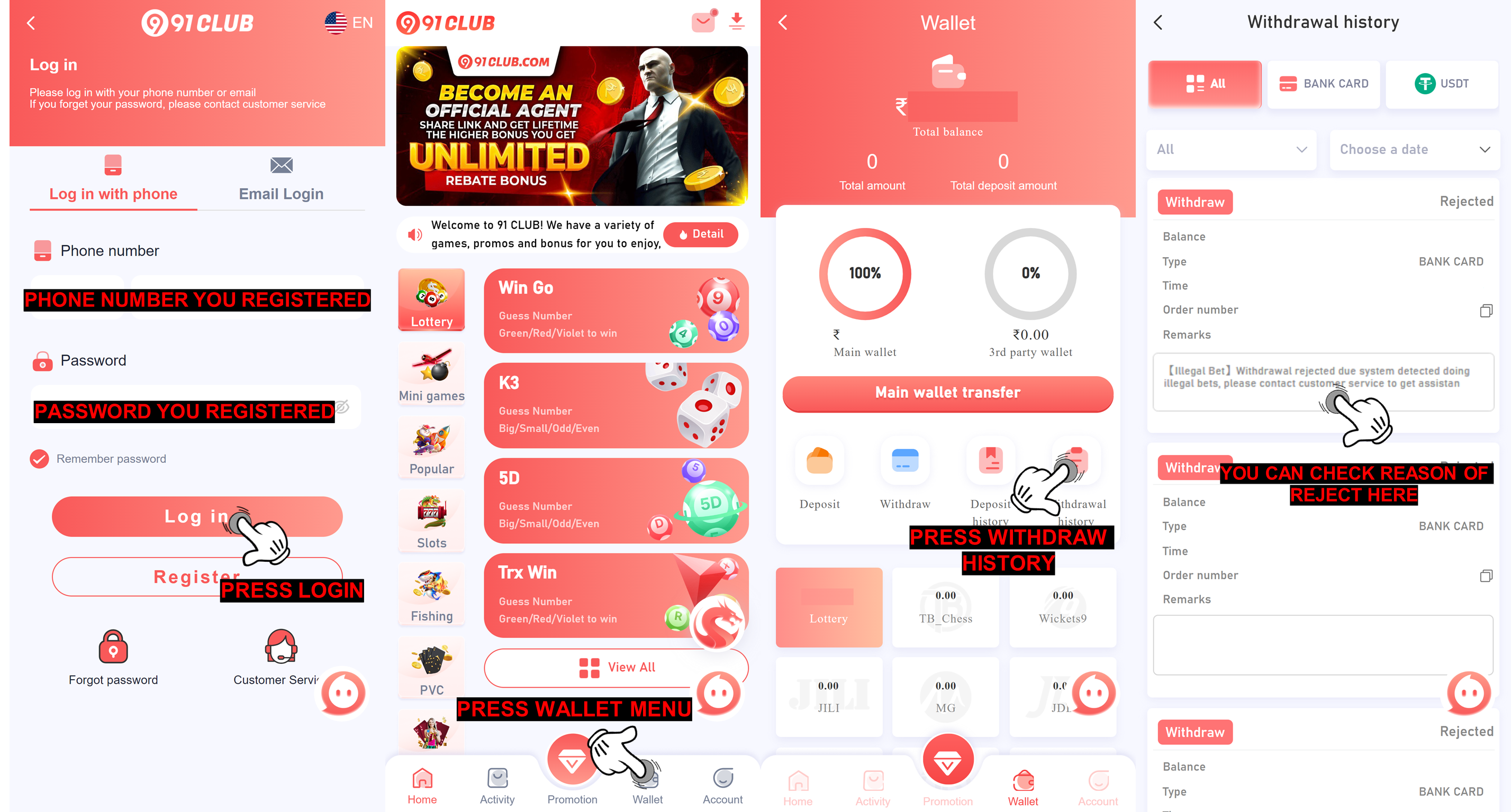 |
|
Bank Inactive We already tried multiple time to process the withdrawal and the balance keeps coming back, we assume the bank account you bind already inactive, and the withdrawal get declined, please submit delete bank account on the self-service customer service center https://www.91service.in/ for remove bank account Q: Why my withdraw rejected with remark bank inactive? A: Since we tried processing your bank account multiple times and the balance kept coming back, we assumed that your bank account was inactive. As a result, we rejected your withdrawal. 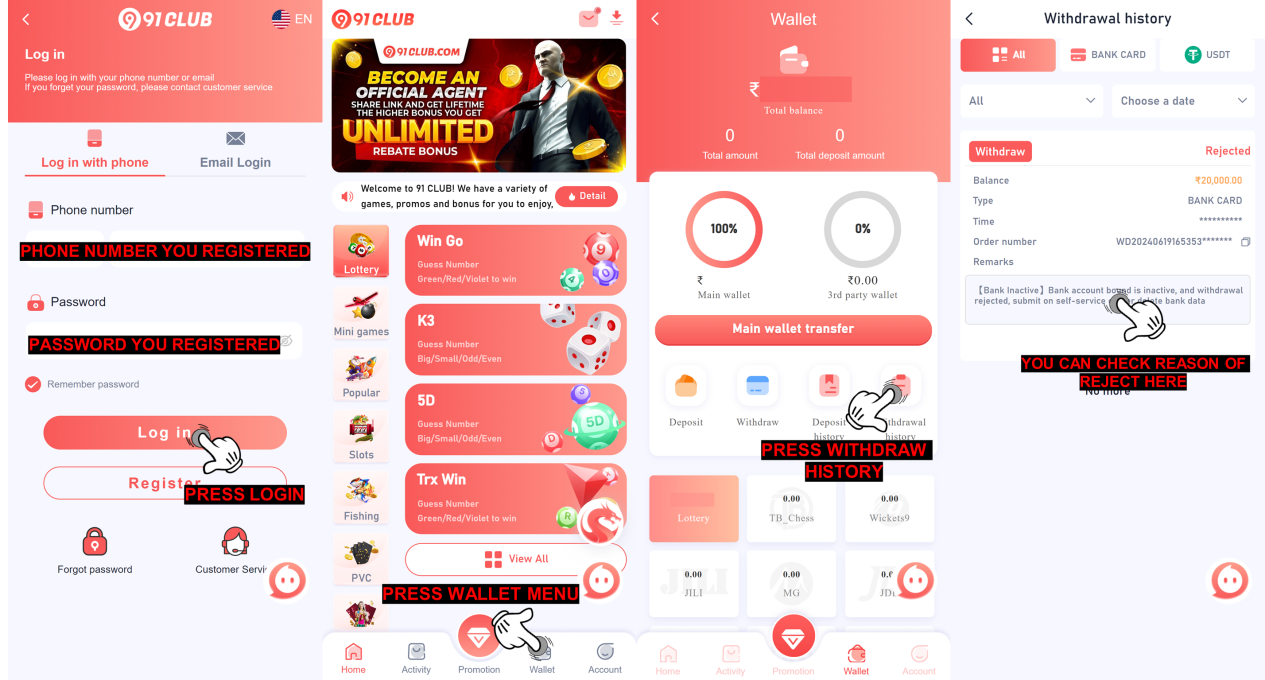 Q: What i need to do now to solve the problem of bank inactive A: What you need to do now is submit it on self-service center 91CLUB, follow this guide to submit it 1. Open self-service center 91CLUB https://www.91service.in/ 2. Select Delete Bank Account 3. Fill ID account 91CLUB 4. Upload photo selfie holding identity card (clear and detail) 5. Upload photo old passbook bank (clear and detail) 6. Upload the latest deposit proof receipt (clear and detail) 7. Press Submit Issue NOTE: Make sure all the data and requirement already fill and upload, clear and detail. 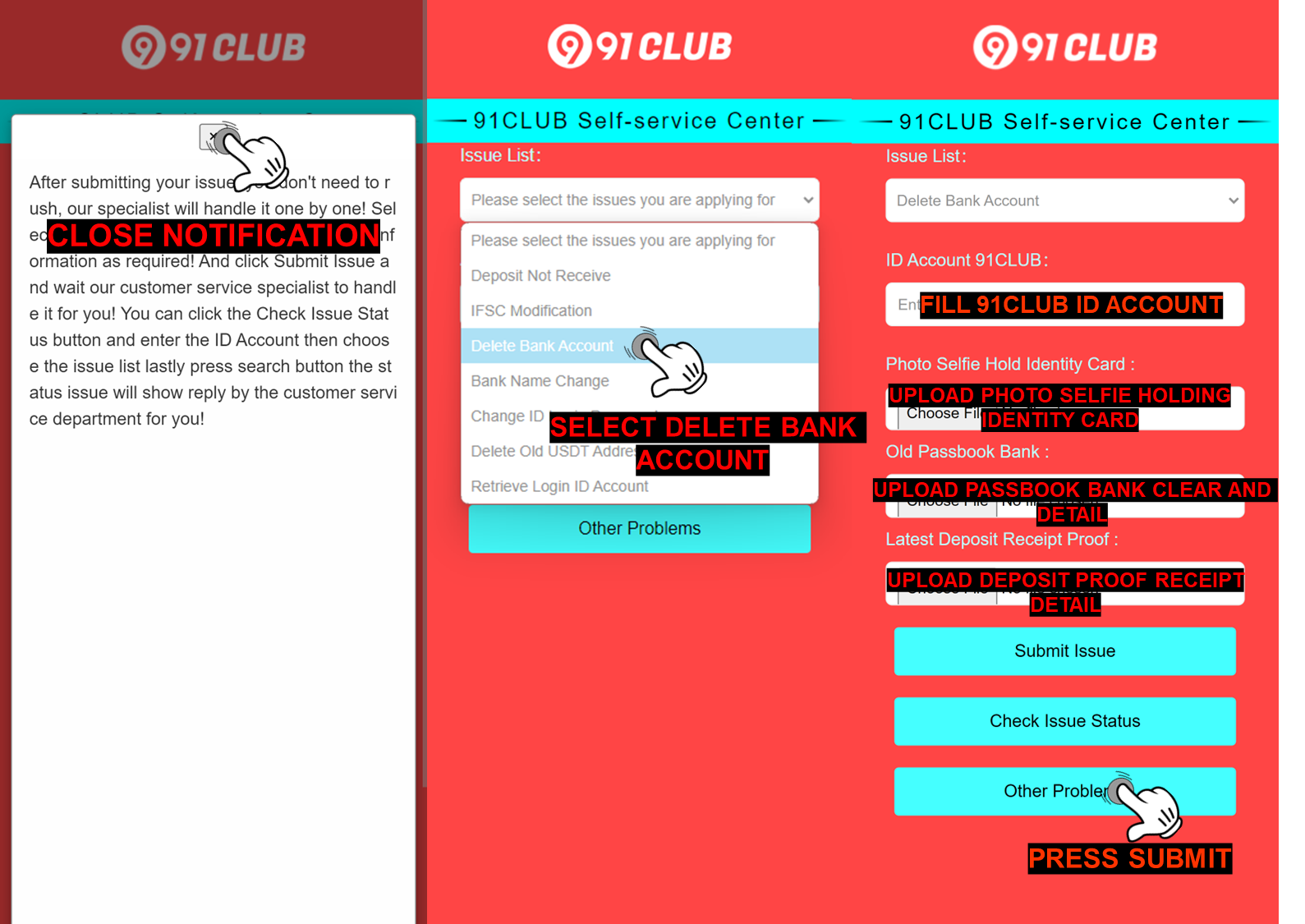 Q: What i need to do after the Delete Bank Account have been completed ? A: After the bank account deletion completed, member can add a new bank account or make a correction to the previous bank information that they bound in their ID account by go to “Withdraw”page and following the steps below : 1. Click add a bank account 2. Select the bank you want to register with 3. Fill in all the requirement information correctly (your full name, bank account number, active phone number, email address and IFSC code) 4. Click Save and SMS Verification menu will appear 5. Click the Send Button 6. Fill the correct OTP Code 7. Click Add confirm button 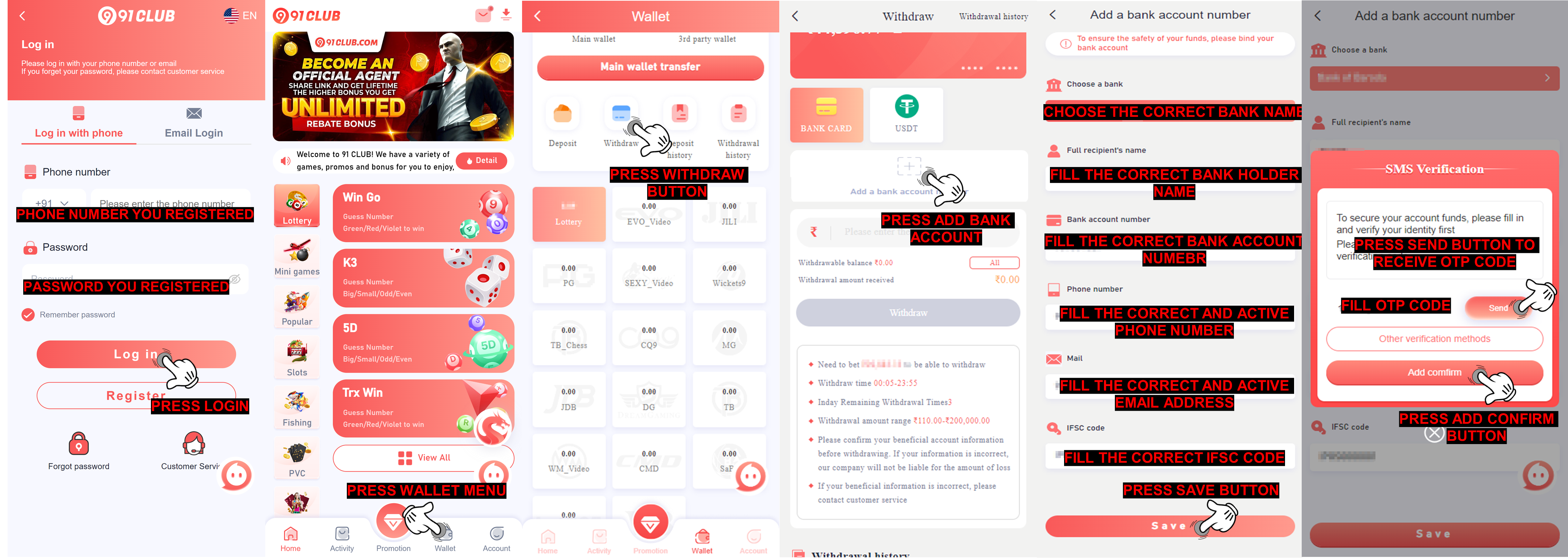 |
|
Maintenance Bank Withdrawal rejected due bank you used is under maintenance, we suggest to wait patiently till the bank online again and try to resubmit the withdrawal after few hours, or submit delete bank account on the self-service customer service center https://www.91service.in/ for delete bank data inside 91CLUB Q: Why my withdraw rejected with remark bank maintenance? A: This rejection is due to the bank you are using under maintenance for this problem we suggest you to wait patiently until the bank online again then you can try to resubmit withdrawal again. 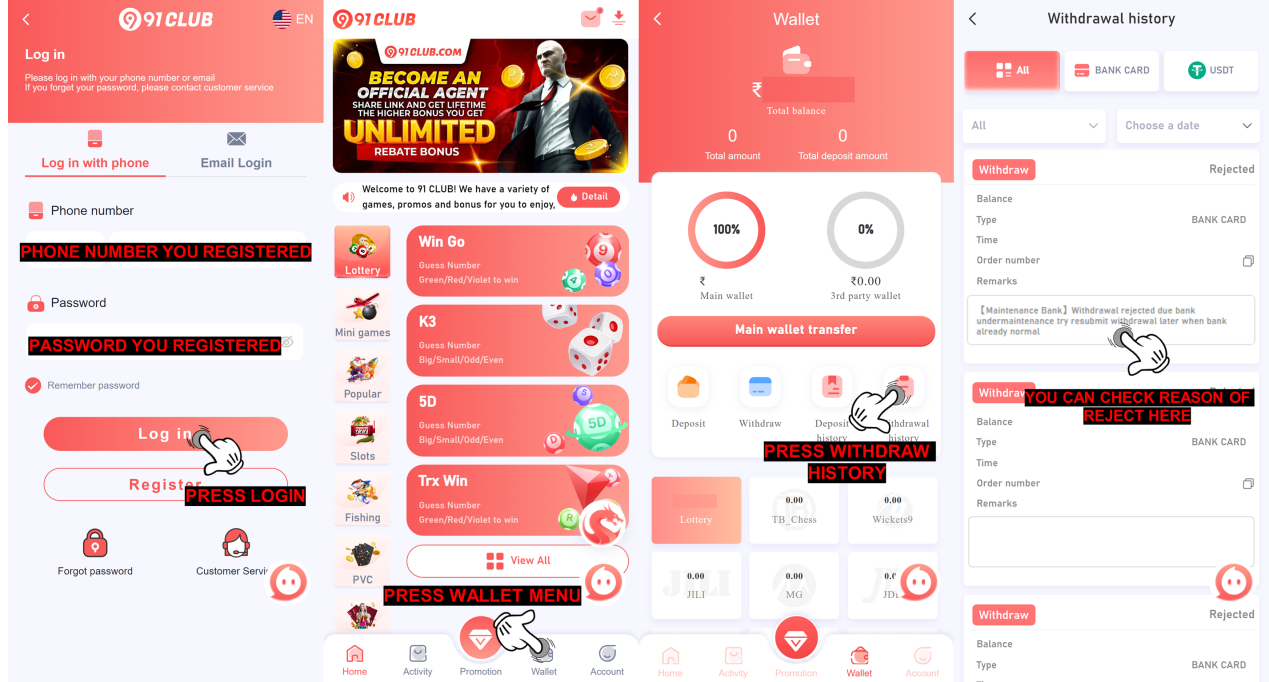 Q: How long the bank will maintenance? A: We apologize for the bank maintenance cannot be predicted is all depend with the bank theirself it can be fast or maybe late. Thank you! Q: Can i change my bank data for withdrawal? A: We suggest you to not changing the bank data since it only maintenance from the bank, but if the maintenance is taking so long you can do delete bank data account by submitting on self-service center 91CLUB and select issue delete bank data, after success delete the bank data you can add new bank data inside your account for your future withdrawal bank by following guideline below : 1. Open self-service center 91CLUB https://www.91service.in/ 2. Select Delete Bank Account 3. Fill ID account 91CLUB 4. Upload photo selfie holding identity card (clear and detail) 5. Upload photo old passbook bank (clear and detail) 6. Upload the latest deposit proof receipt (clear and detail) 7. Press Submit Issue NOTE: Make sure all the data and requirement already fill and upload, clear and detail 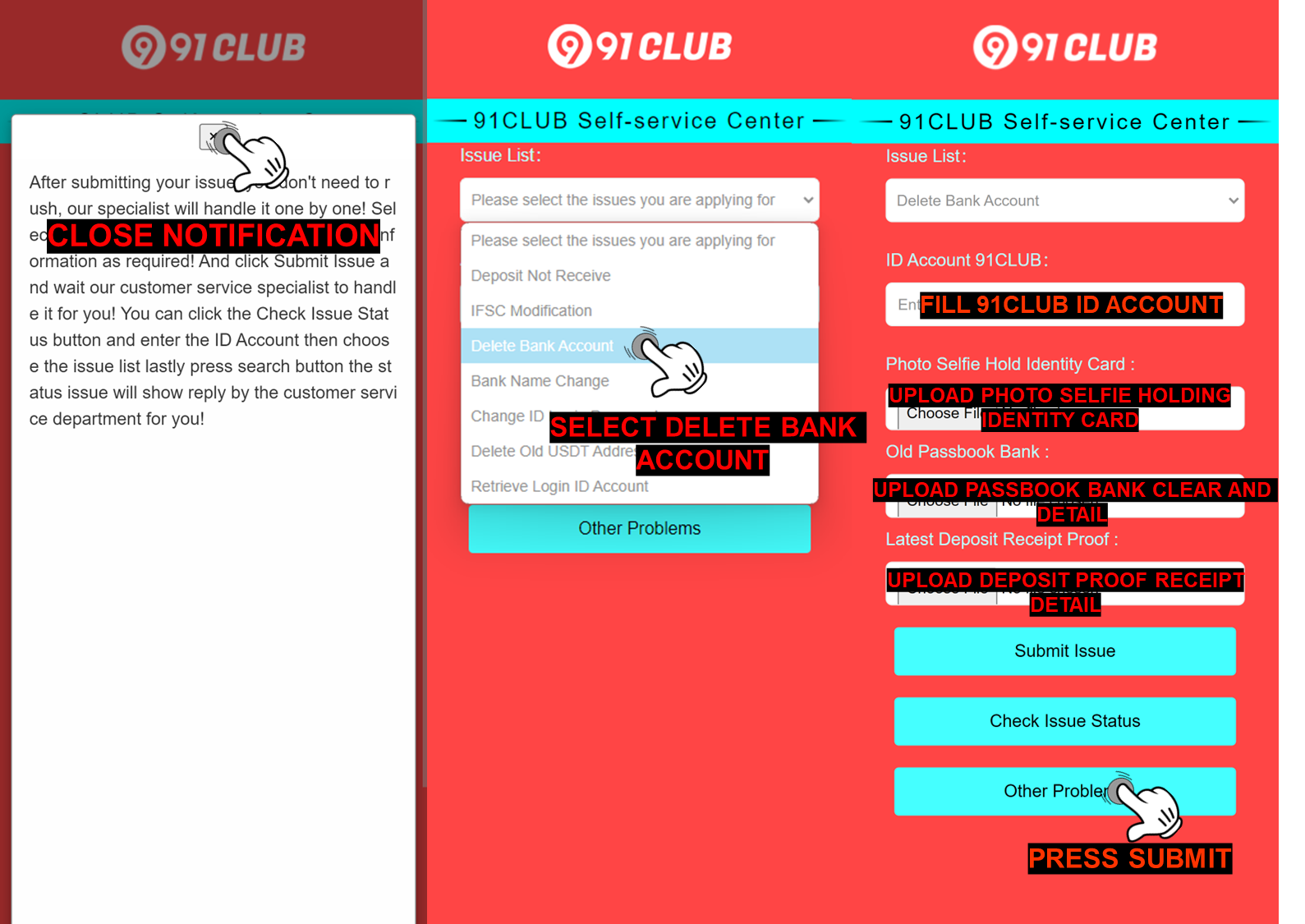 Q: What i need to do after the Delete Bank Account have been completed ? A: After the bank account deletion completed, member can add a new bank account or make a correction to the previous bank information that they bound in their ID account by go to “Withdraw”page and following the steps below : 1. Click add a bank account 2. Select the bank you want to register with 3. Fill in all the requirement information correctly (your full name, bank account number, active phone number, email address and IFSC code) 4. Click Save and SMS Verification menu will appear 5. Click the Send Button 6. Fill the correct OTP Code 7. Click Add confirm button 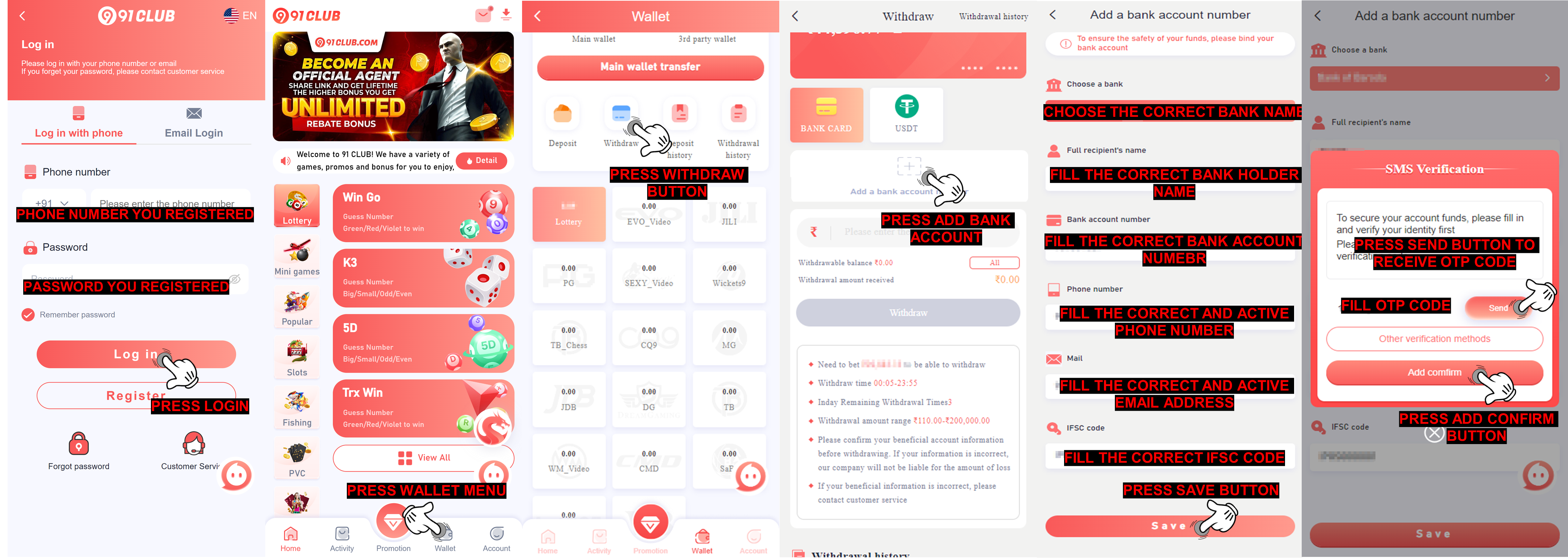 |
|
Fail become Agent Withdrawal rejected due account failed become agent, please contact your superior agent, to contact your superior agent, can be check on promotion menu then press agent line customer service Q: Why my withdraw rejected with remark fail become agent? A: This rejection is due to your 91CLUB account is failed become agent and you need to contact our 91CLUB agent immediately. How To Find The Superior Agent Contact? 1. Log in to your 91CLUB account 2. Click on the Promotion menu 3. Click on the Agent line customer service 4. Click Live chat button 5. Click the telegram button to communicate with 91CLUB agent team 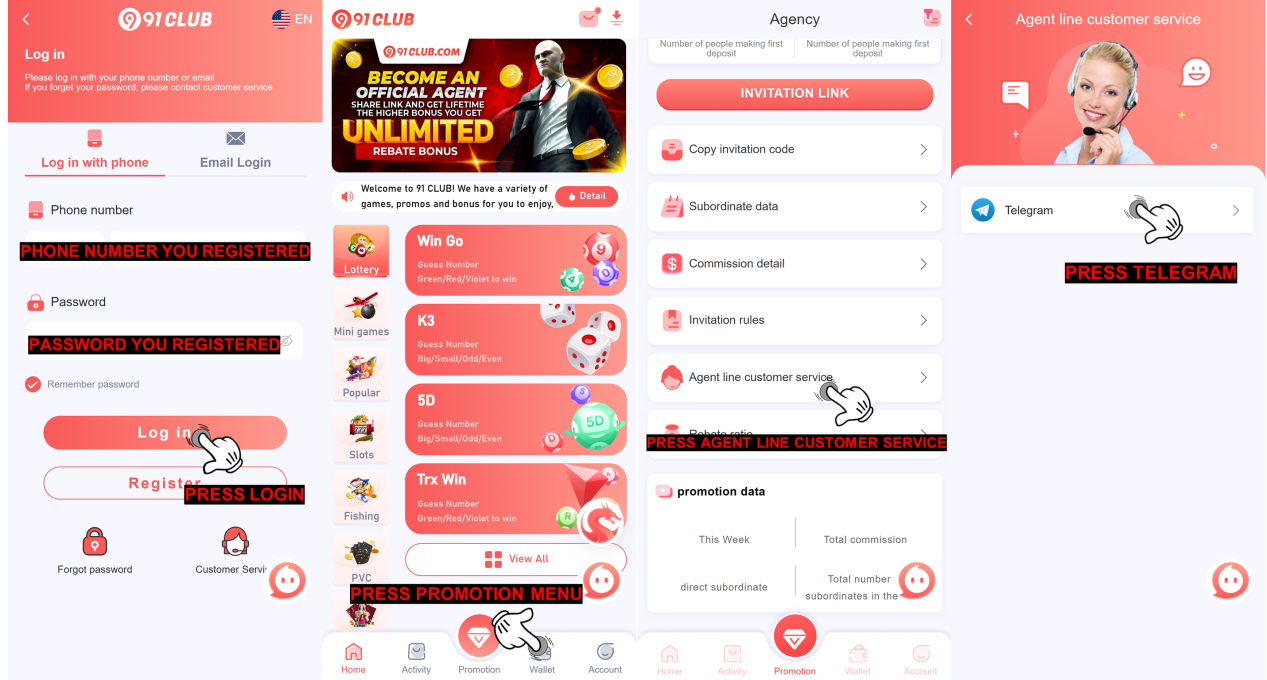 After you already do the conversation and informing about the issue you encounter, superior agent will let general agent know and the general agent will contact you and help to solve your issue 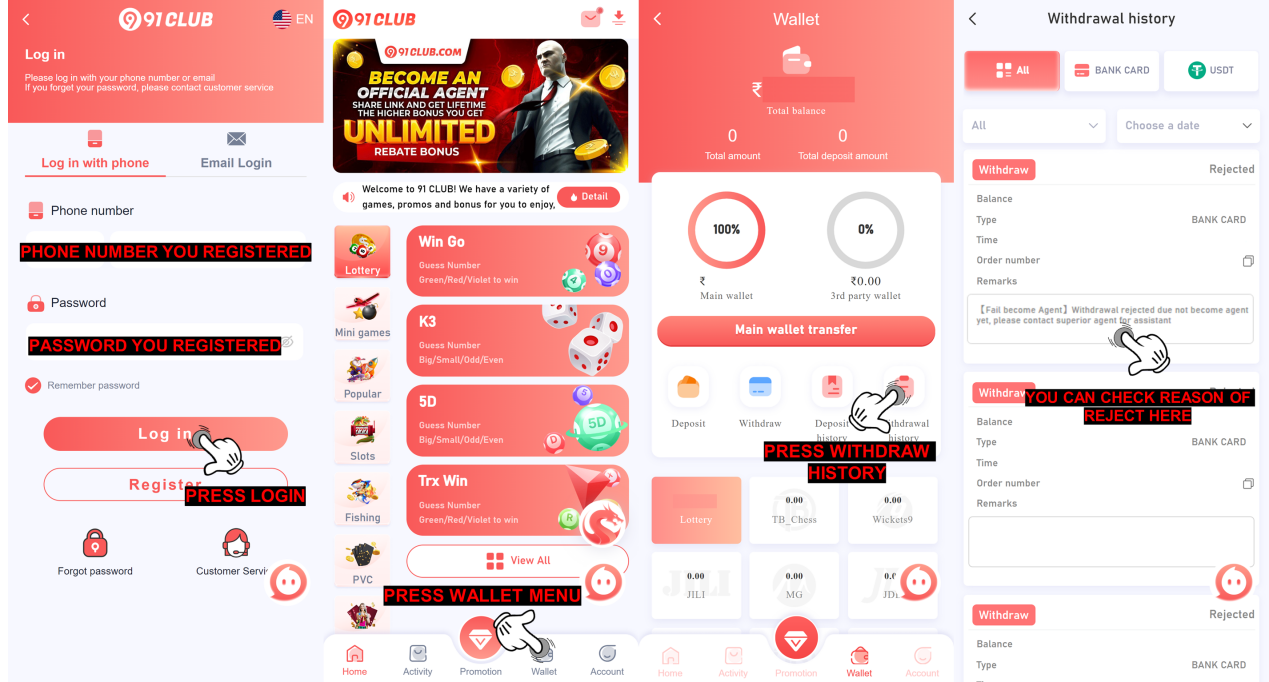 |
|
IFSC Code Inccorret Due to the IFSC incorrect on bank account you bound. please submit on IFSC modification in self-service customer service center https://www.91service.in for remove the bank data inside 91CLUB! Q: Why my withdraw rejected with remark IFSC Code incorect? A: This rejection is due to incorrect IFSC code bank you bound on 91CLUB account for withdraw, for withdrawal we need you to bind all data correctly including the IFSC code, sometimes there are banks that have IFSC codes with the letter O and the number 0 which are similar so that you are confused with the IFSC you are going to use. 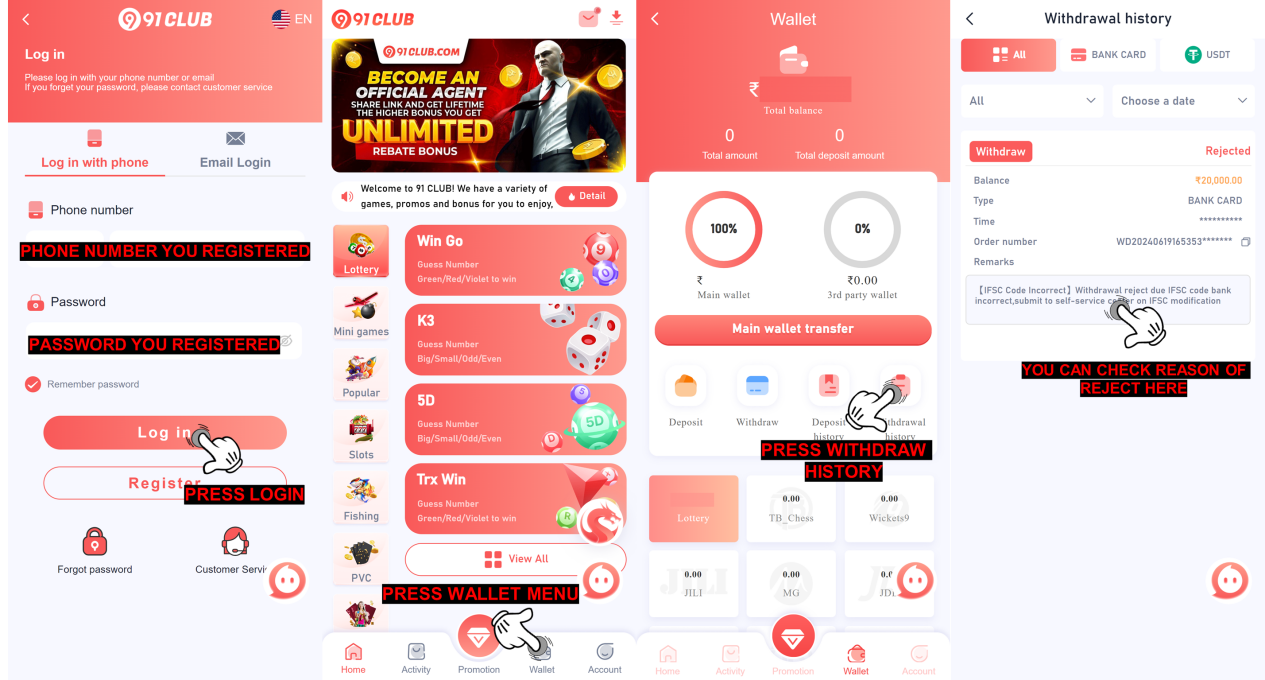 Q: What will happen to my bound bank information if i submit IFSC Modification on self-service center 91CLUB? A: Our specialist will conduct a checking and verification to the information that you provide and If all the information is correct. We will delete your bound bank in your ID account and you will be able to re-bind the correct bank information Q: How i can submit issue about IFSC Modification on self-service center 91CLUB? A: To submit IFSC Modification on self-service center 91CLUB, please follow this step 1. You need to use this link https://www.91service.in 2. After you enter the link then close the notification 3. Select issue and choose IFSC Modification 4. Fill your 91CLUB ID account 5. Fill correct IFSC code bank from passbook / bank statement 6. Submit issue 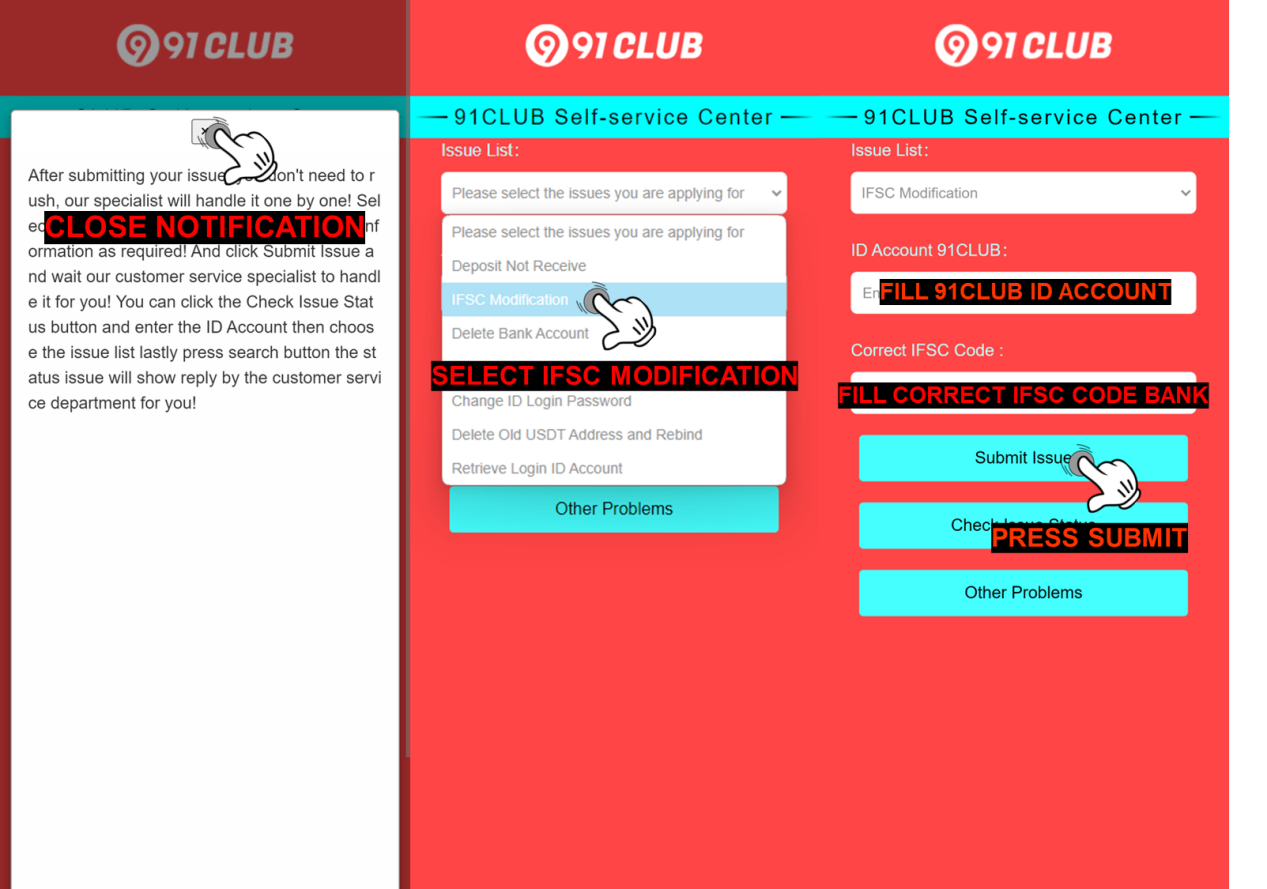 Q: What i need to do after the IFSC Modification completed ? A: After the IFSC Modification completed, your bound bank information will be deleted then you can re-bind the correct bank and make a correction to the previous bank information that you accidentally filled in the wrong IFSC by go to“Withdraw”page and following the steps below : 1. Click add a bank account 2. Select the bank you want to register with 3. Fill in all the requirement information correctly (your full name, bank account number, active phone number, email address and IFSC code) 4. Click Save and SMS Verification menu will appear 5. Click the Send Button 6. Fill the correct OTP Code 7. Click Add confirm button 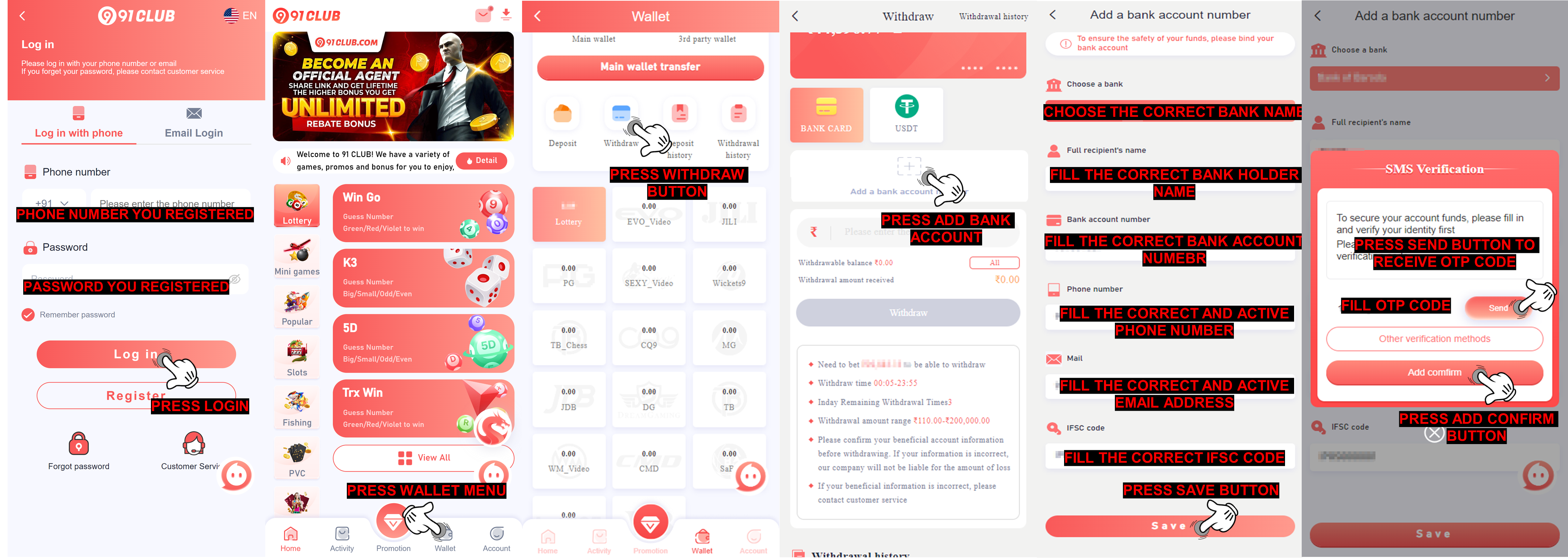 |
|
Bank Limit This withdrawal rejected due the bank you bound already limit. you can contact the bank and wait for the limit resetting for you can do withdrawal, or submit delete bank data on the self-service customer service center https://www.91service.in/ to delete bank bound inside 91CLUB! Q: Why my withdraw rejected with remark bank limit? A: This rejection is due to the bank you are using for withdrawal already reach limit to receive the money, and also you need to know on 91CLUB for withdrawal can be apply 3 times per day, once the withdrawal already reach the quota you can do withdrawal again when it already reset for reset time on 00:00 am 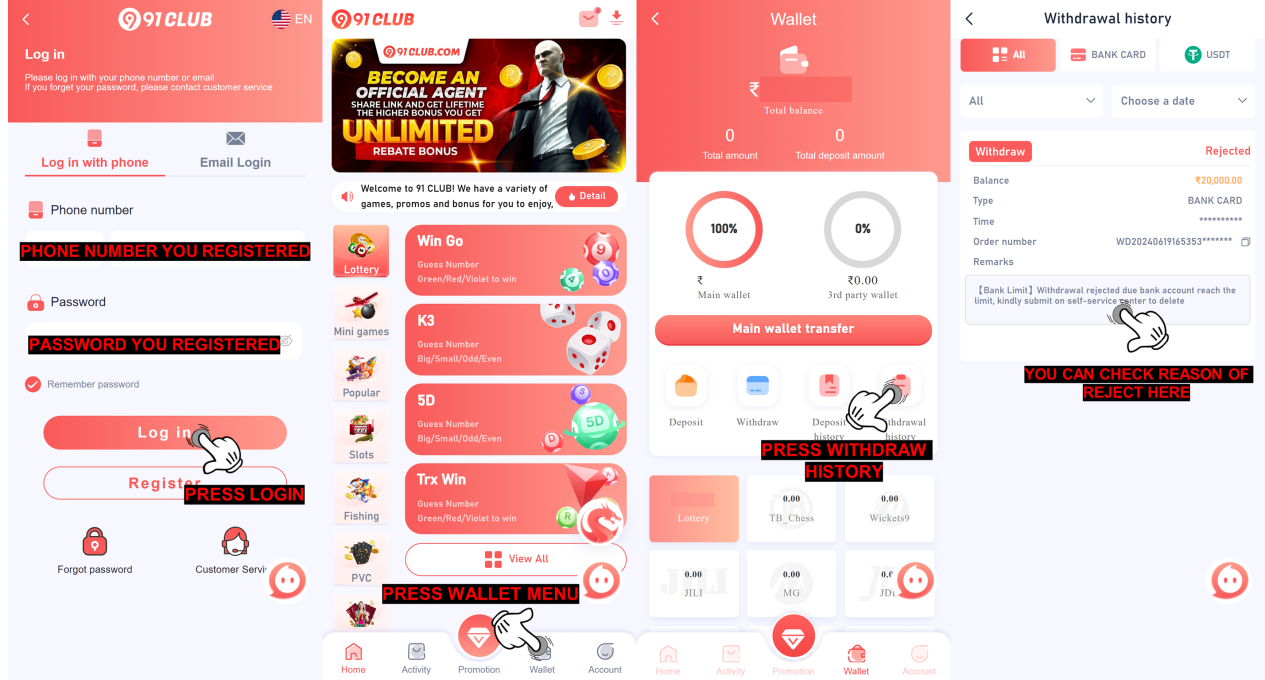 Q: What i need to do now to solve the problem remark bank limit due to my bank problem A: What you need to do now is submit it on self-service center 91CLUB, follow this guide to submit it 1. Open self-service center 91CLUB https://www.91service.in/ 2. Select Delete Bank Account 3. Fill ID account 91CLUB 4. Upload photo selfie holding identity card (clear and detail) 5. Upload photo old passbook bank (clear and detail) 6. Upload the latest deposit proof receipt (clear and detail) 7. Press Submit Issue NOTE: Make sure all the data and requirement already fill and upload, clear and detail 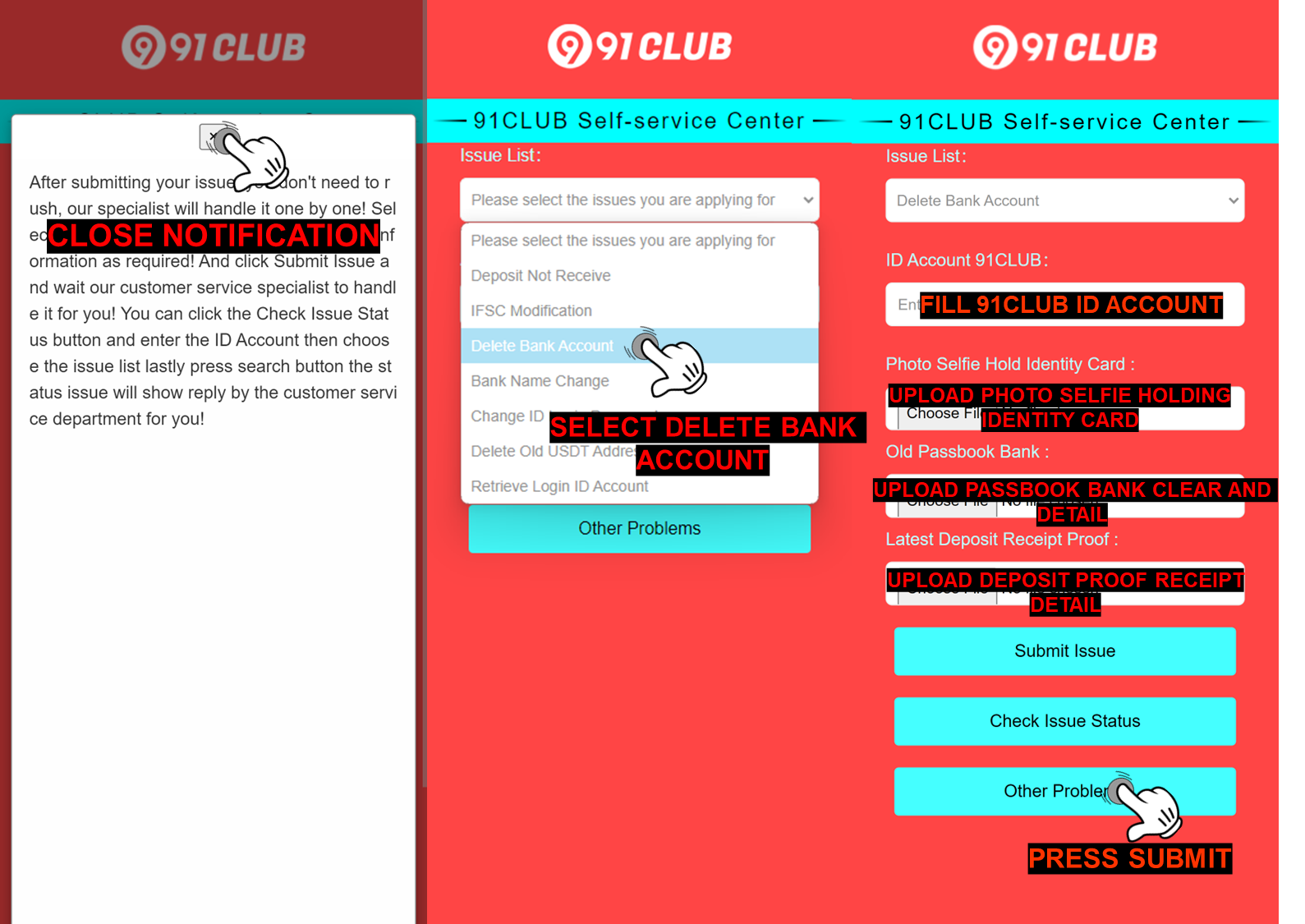 Q: What i need to do after the Delete Bank Account have been completed ? A: After the bank account deletion completed, member can add a new bank account or make a correction to the previous bank information that they bound in their ID account by go to “Withdraw”page and following the steps below : 1. Click add a bank account 2. Select the bank you want to register with 3. Fill in all the requirement information correctly (your full name, bank account number, active phone number, email address and IFSC code) 4. Click Save and SMS Verification menu will appear 5. Click the Send Button 6. Fill the correct OTP Code 7. Click Add confirm button 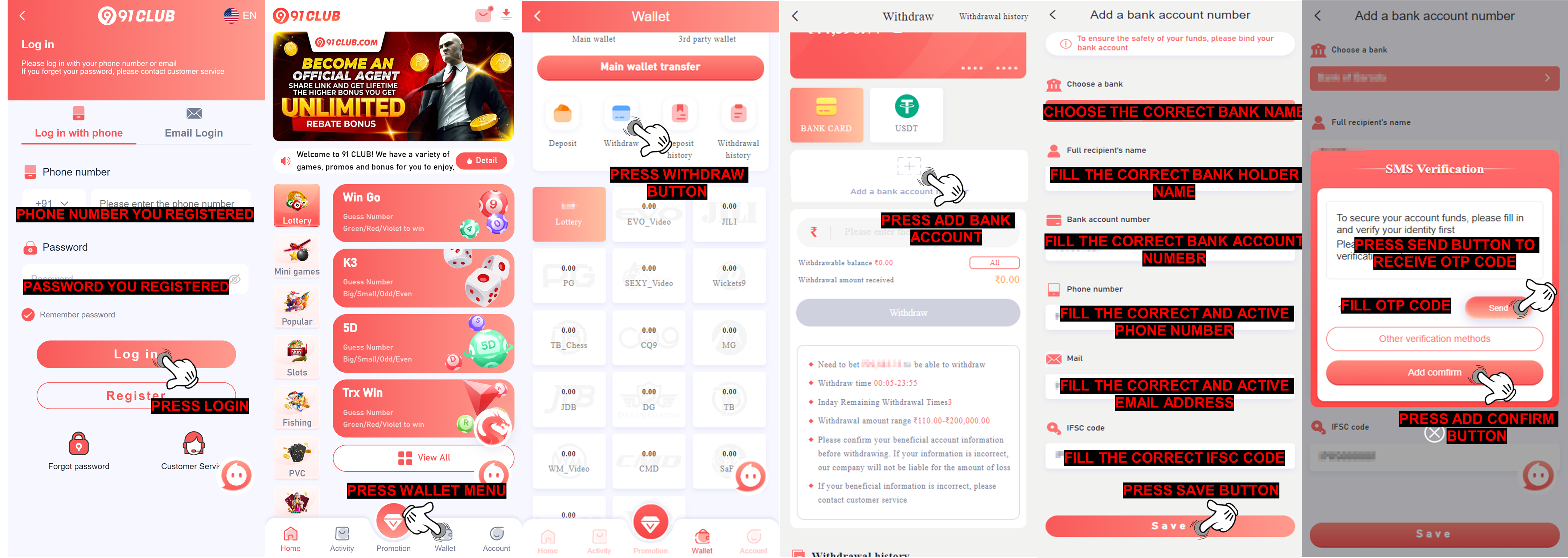 |
|
Techincal Issue Withdrawal get reject due techincal problem encountered by our withdrawal department when processing the withdrawal to your bank account, rest assured you only need to resubmit the withdrawal and wait till the withdrawal success, if the bank data is problem, our withdrawal department will reject and remark the bank data problem. Q: Why my withdraw rejected with remark technical issue? A: This rejection is due to technical issue from our withdrawal department when processing the withdrawal to your bank account 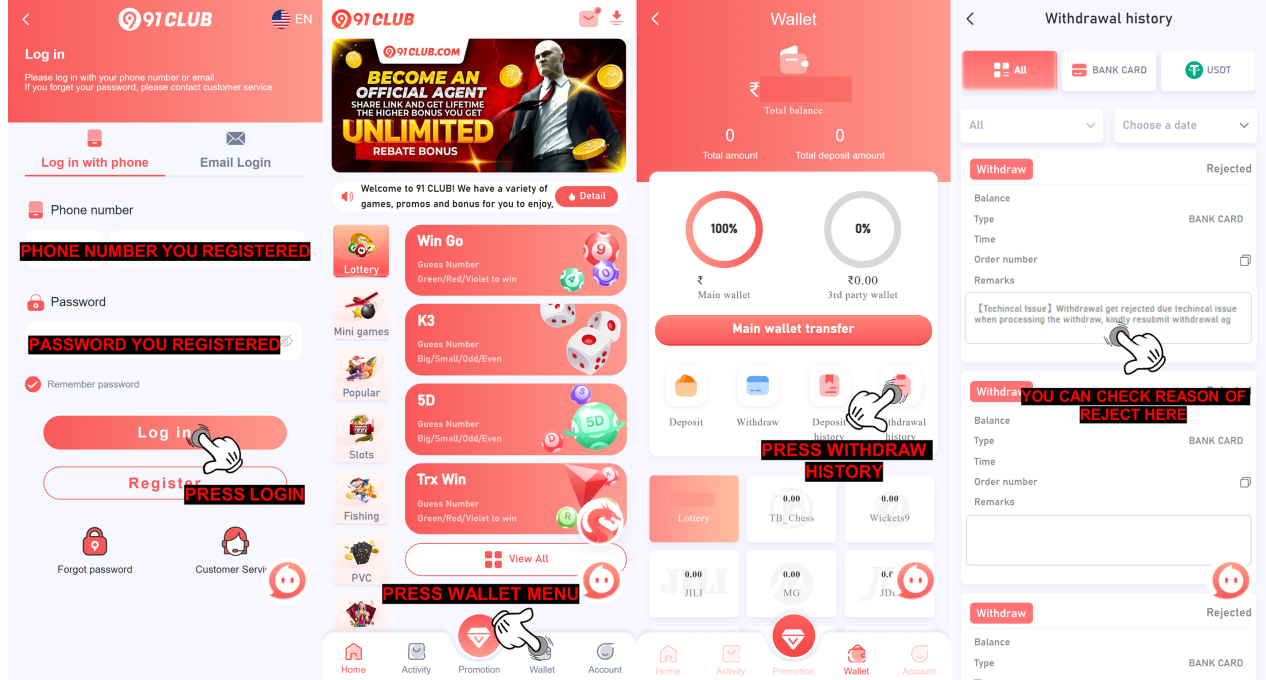 Withdrawal Time and Limit Q: What is the withdrawal time? A: Hello, we offer online withdrawals 24 hours a day. You can send withdrawals between 00:00 and 23:59. When you request a withdrawal, the finance team will review your withdrawal request within 24 hours. Thank you Q: What about withdrawal limit per day? A: For Withdrawal limit 91CLUB per day can apply 3 times per ID and a limit of amount withdrawal start from 110-100.000 rupees. 91CLUB withdrawals must reach 1 times of your recharge amount ( if you recharge 1,000 rupees, you must effectively bet 1,000 rupees before you can withdraw it). If you participate in some activities with rolling restrictions, additional rolling restrictions will be added! On the withdrawal page, we will help you count whether you have met the withdrawal requirements! |